Before workflow fit is proven
Do the task manually first. Automation amplifies a bad process.
API
Winning Hunter has official API and MCP documentation, but you should validate the workflow manually before automating research.
Quick Answer
Use the API only after the manual workflow is worth repeating. Official docs list API key authentication, /api/v1 routes, 1 credit per successful metered request, 20,000 monthly credits per user, and a 60 requests per rolling 60 seconds rate limit.
| Fact | Source | Developer implication |
|---|---|---|
| API and MCP are live. | Official developer hub. | There is a documented automation surface, not just a marketing promise. |
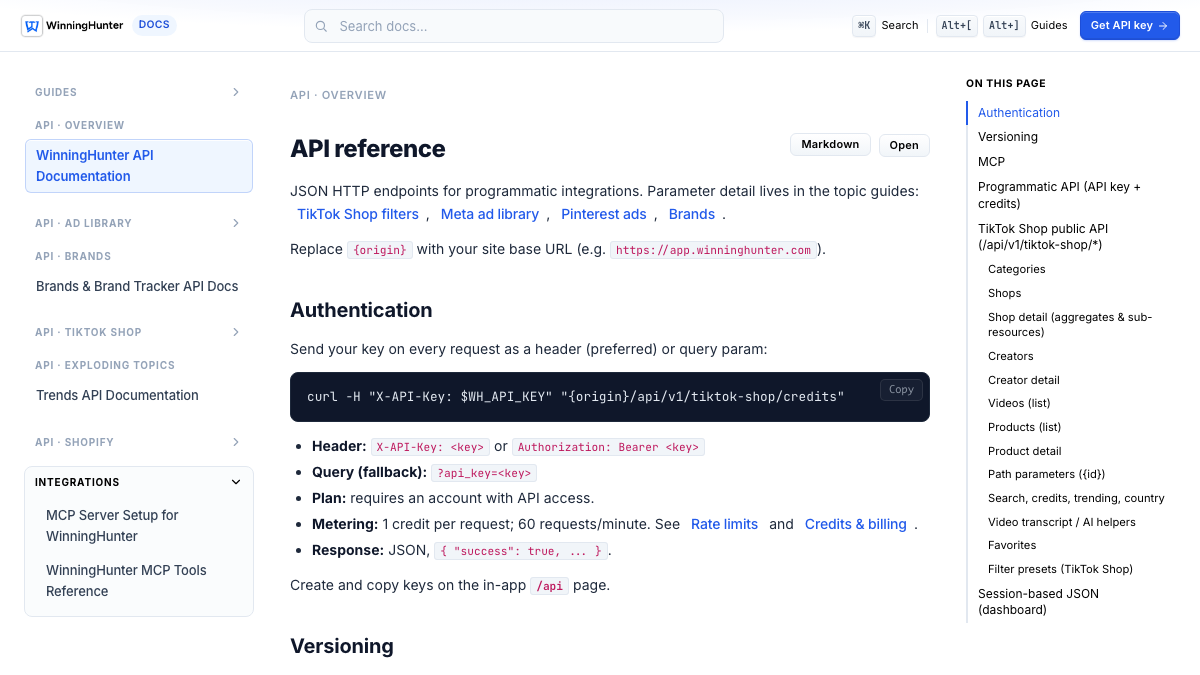
| Preferred auth is X-API-Key; Bearer token is also listed; query parameter is fallback. | Authentication docs. | Use server-side headers and keep keys out of client code. |
| Programmatic routes use /api/v1 paths across TikTok Shop, adlibrary, Pinterest ads, Magic AI, store tracker/explorer, and brands. | API reference. | Build against documented /api/v1 routes, not dashboard session routes. |
| Default monthly API pool is 20,000 credits per user, and successful metered requests cost 1 credit. | Credits and billing docs. | Batch and cache requests before building daily automation. |
| Rate limit is 60 requests per rolling 60 seconds per billing account. | Rate limit docs. | Use pacing, backoff, and avoid parallel loops without a shared limiter. |
Official docs list three ways to send a key. The safest public recommendation is to use a server-side header, not a query parameter.
| Method | Use | Caution |
|---|---|---|
| X-API-Key | Preferred header. | Keep it in server-side environment variables. |
| Authorization: Bearer | Also supported by official docs. | Use standard secret handling. |
| api_key query parameter | Fallback only. | Avoid for sensitive use because URLs can leak into logs and history. |
The official docs use a credits check as a first authenticated request. Replace origin with the app origin shown in the docs and use your real key.
curl -sS \
  -H "X-API-Key: $WH_API_KEY" \
"{origin}/api/v1/tiktok-shop/credits" | Limit | Official value checked | What to do |
|---|---|---|
| Monthly credits | 20,000 credits per user by default. | Plan for daily capacity, not just burst speed. |
| Cost per successful metered request | 1 credit. | Batch filters and avoid polling credits too often. |
| Rate limit | 60 requests per rolling 60 seconds per billing account. | Use one worker or shared rate limiting for larger jobs. |
| Plan access | API requires an account with API access. | Confirm account access before building. |
Do the task manually first. Automation amplifies a bad process.
The web app is a better first step when you do not know your filters yet.
Daily pulls can exhaust monthly credits faster than expected.
Keep keys out of browser bundles, mobile apps, and public repositories.
Fact-check note
Fact-check note: Last checked: August 12, 2026
Sources checked:
Plan names, prices, API access, credits, and limits can change. Verify the live official pages before buying or building an integration.
Yes. Official docs say API and MCP are live and document JSON HTTP endpoints for programmatic integrations.
Official docs list X-API-Key as the preferred header, Authorization Bearer as another option, and api_key query parameter as a fallback.
Official rate limit docs list 60 requests per rolling 60 seconds per billing account.
Official credits docs list a default monthly limit of 20,000 credits per user and 1 credit per successful metered request.
The docs say API access requires an account with API access. Confirm access in the app before building a workflow around it.
No. Validate the workflow manually first. Use the API only after you know which filters, outputs, and review steps are worth automating.
No. Official docs distinguish API-key routes from browser-session dashboard routes. Use the documented /api/v1 paths for integrations.